


Thank You for Holding: How Phone Menu and On-Hold Voice Jobs Are Briefed, Recorded and Delivered
Every business with a phone line needs someone to say “thank you for calling.” Phone menu and on-hold jobs are short, they come back every time something changes, and they’re fussier than they look. Here’s how the work is briefed, recorded and delivered, taken from the phone platforms’ own documentation and from voice actors who do it.
Phone menus, auto attendants and on-hold messages are the quiet corner of voice work. Nobody shares them on social media and nobody gets a screen credit. But a company that likes its phone voice tends to keep it, and it needs that voice again whenever its opening hours, departments or holiday message change. For a working voice actor that’s the appeal: small jobs that repeat. It’s also the hard part, because a caller may hear your welcome and a prompt recorded two years later in the same call.
What the brief looks like
A phone system script isn’t a story. It’s a list of short prompts, and each one becomes its own audio file. Microsoft’s guide for teams building speech systems calls the recording script “a map or take sheet to the actual recordings.” It says the script is “usually recorded in order,” and that “It saves a step, if the filenames and takes are annotated as the recording proceeds.”
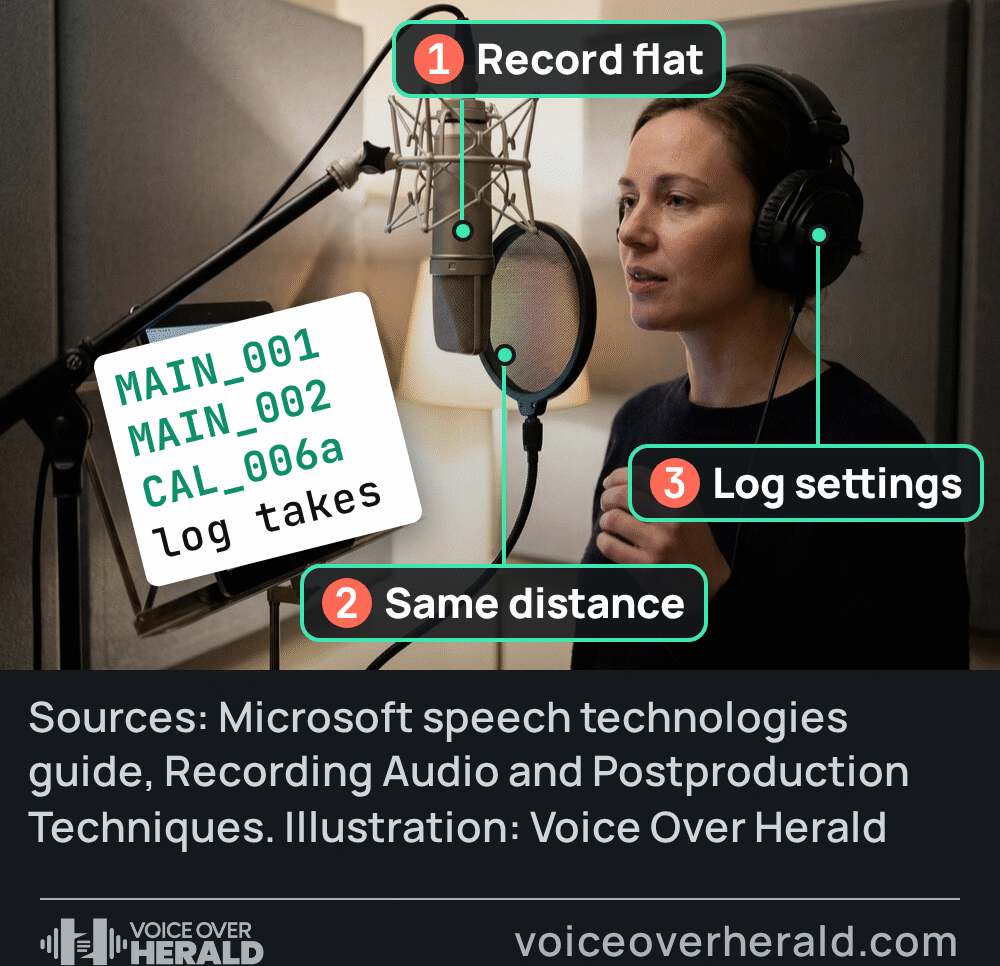
The file names matter more than in almost any other genre, because a developer will drop each file into the call flow by name. Microsoft’s own examples run from “CAL_001.wav through CAL_999.wav” for a set of calendar prompts, with a fixed take saved as something like CAL_006a.wav, and its editing guide tells producers to “try to maintain the original filenames” when the files go into the system. If the client’s list says MAIN_MENU_02, that’s exactly what your file is called. No “final,” no “v2,” no spaces they didn’t ask for.
Before you record, ask three things briefs often leave out: which phone system the files are for, whether they want them as recorded or converted for the phone line, and whether any prompts get joined together, like a balance read as separate numbers.
One voice, for years
Consistency is the real skill being hired. Microsoft’s recording guide lists what to watch from prompt to prompt so they “match and make sense”: “These elements include pronunciation, amplitude, emotional intensity and pacing.”
Allison Smith, a Calgary voice-over artist who had recorded voice prompts for clients around the world, put it neatly in 2007 to Speech Technology magazine: “You need a continuity of flavor.” She added: “For a caller to listen to a patchwork of different sounds and voices will never work.” The upside for the actor is in her next point: “If you hire someone, you have a better chance of matching their previous prompts.”
That match is your job months later, when the client sends three new lines. Microsoft’s advice is to record the voice “with minimal processing, or flat in recording parlance,” and leave any “post-processing, tone-equalizing, down-sampling or other techniques” until afterwards. A flat recording is far easier to match than one baked with a plugin chain you’ve since changed. Its postproduction guide adds a rule worth taping to the wall: “Always save separate versions of the files at each stage of the process. Do not save over the source files.”
The practical habit is a session note for every phone client: mic, distance, preamp gain, settings, and one reference file of the main welcome. Play that reference before any pickup and match it, rather than trusting your memory of last spring.
Numbers, dates and the joins
Some systems don’t play whole sentences. They stitch prompts together, so “your balance is” is followed by separately recorded numbers. That’s where phone work turns technical. Microsoft’s guide notes that “Recording an additional ten digits spoken with a downward inflection, can greatly improve the concatenation.” A number that ends a sentence usually falls in pitch, while the same number mid-sentence doesn’t.
 VoiceEditSuiteLoudness NormalizerHit the broadcast spec first time.ACX, EBU R128, Spotify and podcast presets.See how it works
To get a natural middle-of-the-sentence shape, the guide suggests a carrier phrase. “Often the name “Patrick” is used because it begins and ends with hard consonants that cannot be slurred. The carrier phrase is then removed from prompt after recording.” You read “Patrick five Patrick,” and the editor keeps only the five.
Trimming is different here too. Most editors trim tightly, but for files going into a prompt database Microsoft says that practice “is not recommended” and advises: “Leave at least 0.2 second of silence before and after the audio material.” That guide dates from 2006 and was written for Microsoft’s own speech software, so treat it as a reason to ask, not a universal rule. Some clients want tight files, some want padding. If the brief doesn’t say, ask before you trim a few hundred files.
Pace: shorter than you think
On-hold scripts tend to arrive too long. “You can’t pack 115 words into 30 seconds and expect a warm, relaxed read,” voice-over artist Craig Burnett told the same magazine, which put an average script at “about two-and-a-half words per second.” If a 30 second message runs well over that, tell the client before you record. A rushed hold message plays over and over to the same caller, and the welcome line every caller hears deserves your most takes.
What the phone system will accept
Phone lines carry a narrow slice of sound, and the platforms say so plainly. Amazon Connect, Amazon’s cloud contact centre, warns in its administrator guide that if you use “higher rated audio libraries, such as 16 KHz files,” it “has to down sample them into 8 KHz samples because of PSTN limitations. This might result in low quality audio.” For prompts played from cloud storage it’s stricter: “You must use .wav files that are 8KHz, and mono channel audio with U-Law encoding. Otherwise, the prompt won’t play correctly.”
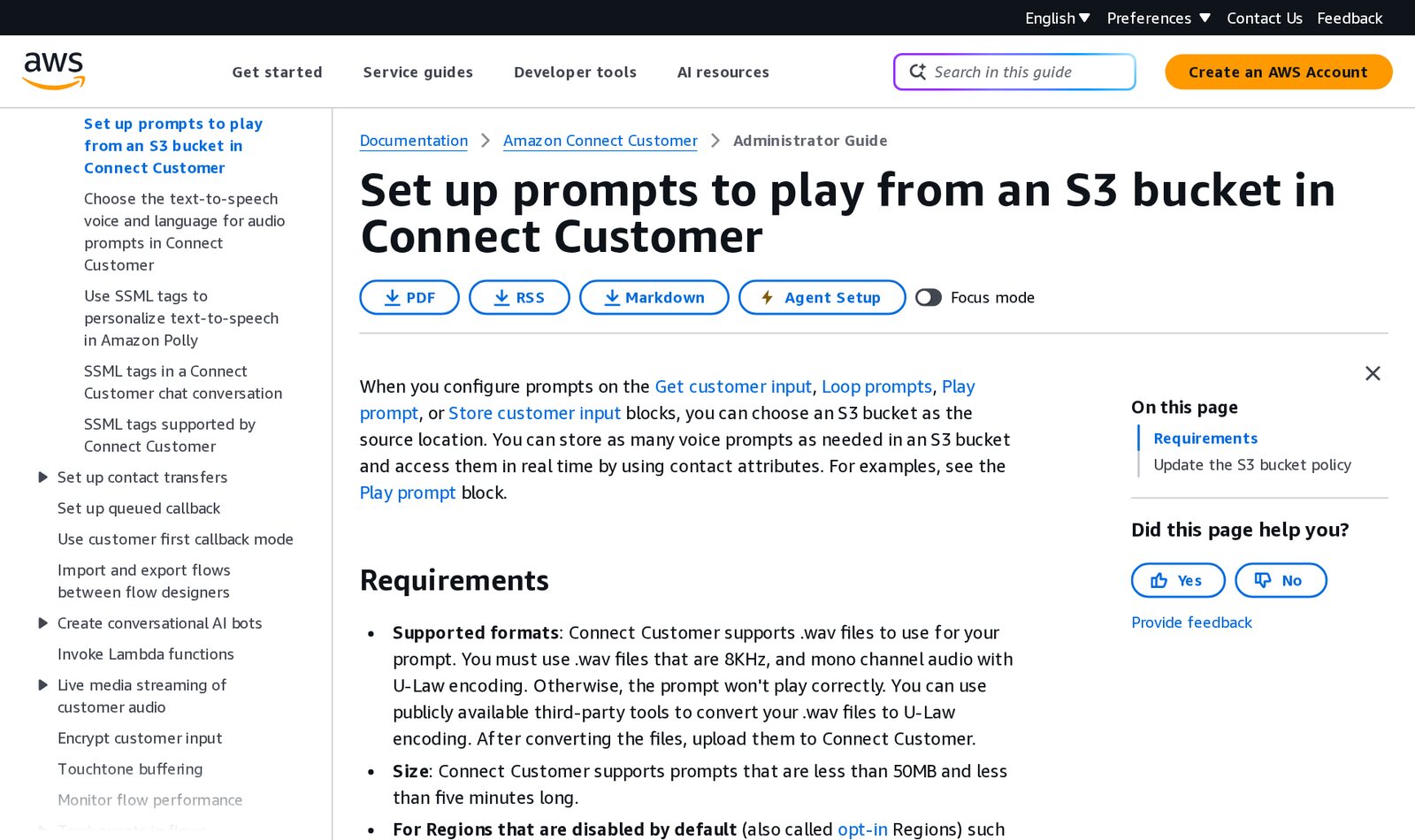
Amazon's prompt file requirements in the Amazon Connect Administrator Guide, as they appeared on 21 November 2026. Screenshot: docs.aws.amazon.com
U-law is a telephone encoding most voice actors never touch, so ask who converts. Some clients want your normal WAV for their engineer. Others want files that drop straight in, and then conversion is part of your delivery and your quote.
Microsoft Teams, which offers auto attendants for business phone lines, is looser. Its supported configurations page lists WAV in “uncompressed, linear PCM” at 8, 16 or 32 bit, in mono or stereo, along with MP3, and says the file “can’t be larger than 5 MB.” There’s a recent change on that page too. “WMA files will not be supported starting November 1, 2026,” it says, although “Existing WMA audio prompts will continue to work.” If a long-standing client used to ask for WMA, new files now need to be WAV or MP3.
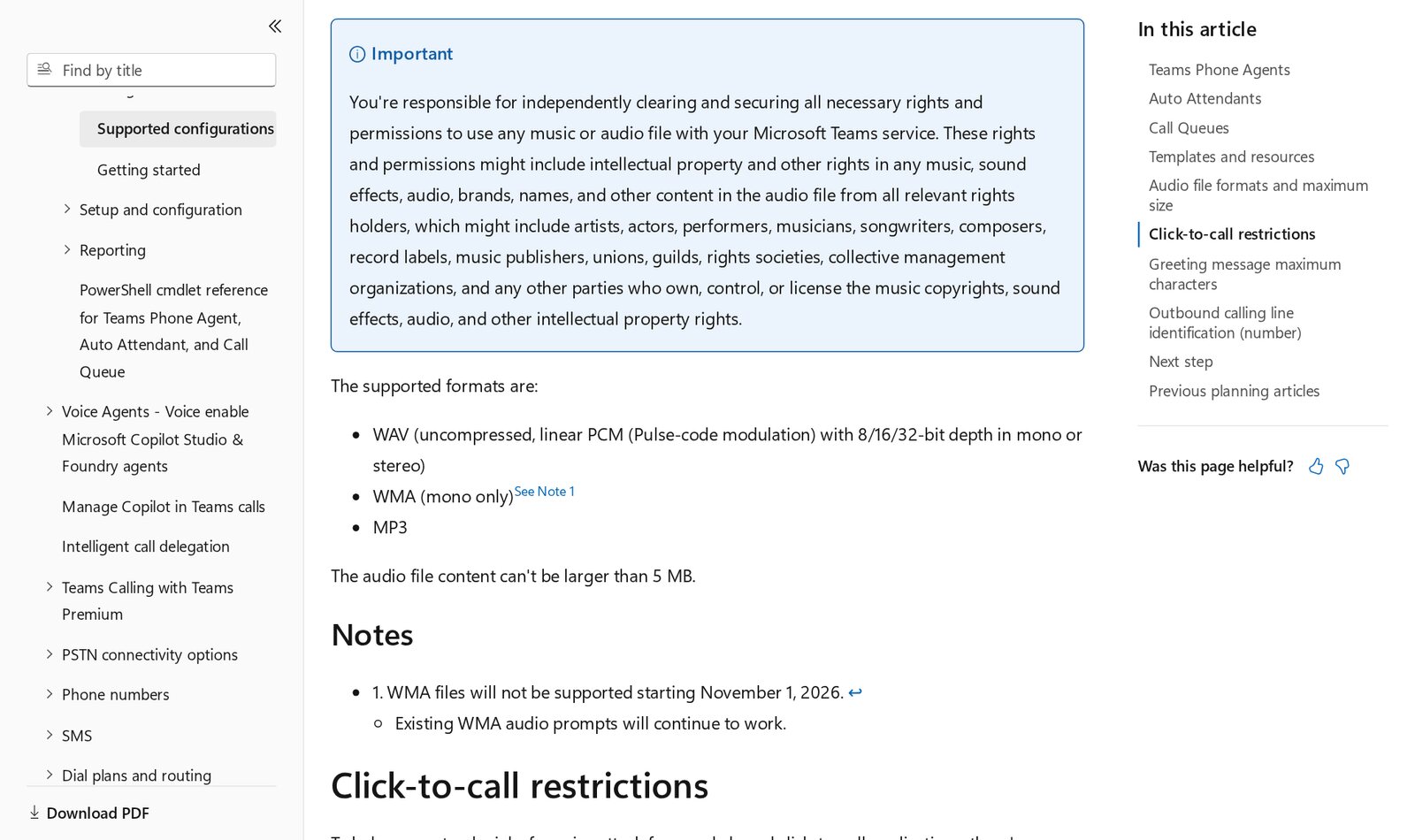
Microsoft's supported audio formats for Teams auto attendants and call queues, as they appeared on 21 November 2026. Screenshot: learn.microsoft.com
Record rich, deliver narrow
Whatever format you deliver, the call itself squeezes the sound. Twilio, a cloud platform developers use to build phone systems, puts it bluntly in its documentation: “Regardless of the quality of the file you provide us, we will transcode so it plays correctly.” It also warns that “High bitrate, lossy encoded files, such as 128kbps mp3 files, will take longer to transcode and potentially sound worse than files that are in lossless 8kbps formats.” In other words, a big MP3 isn’t a safer choice than an uncompressed file.
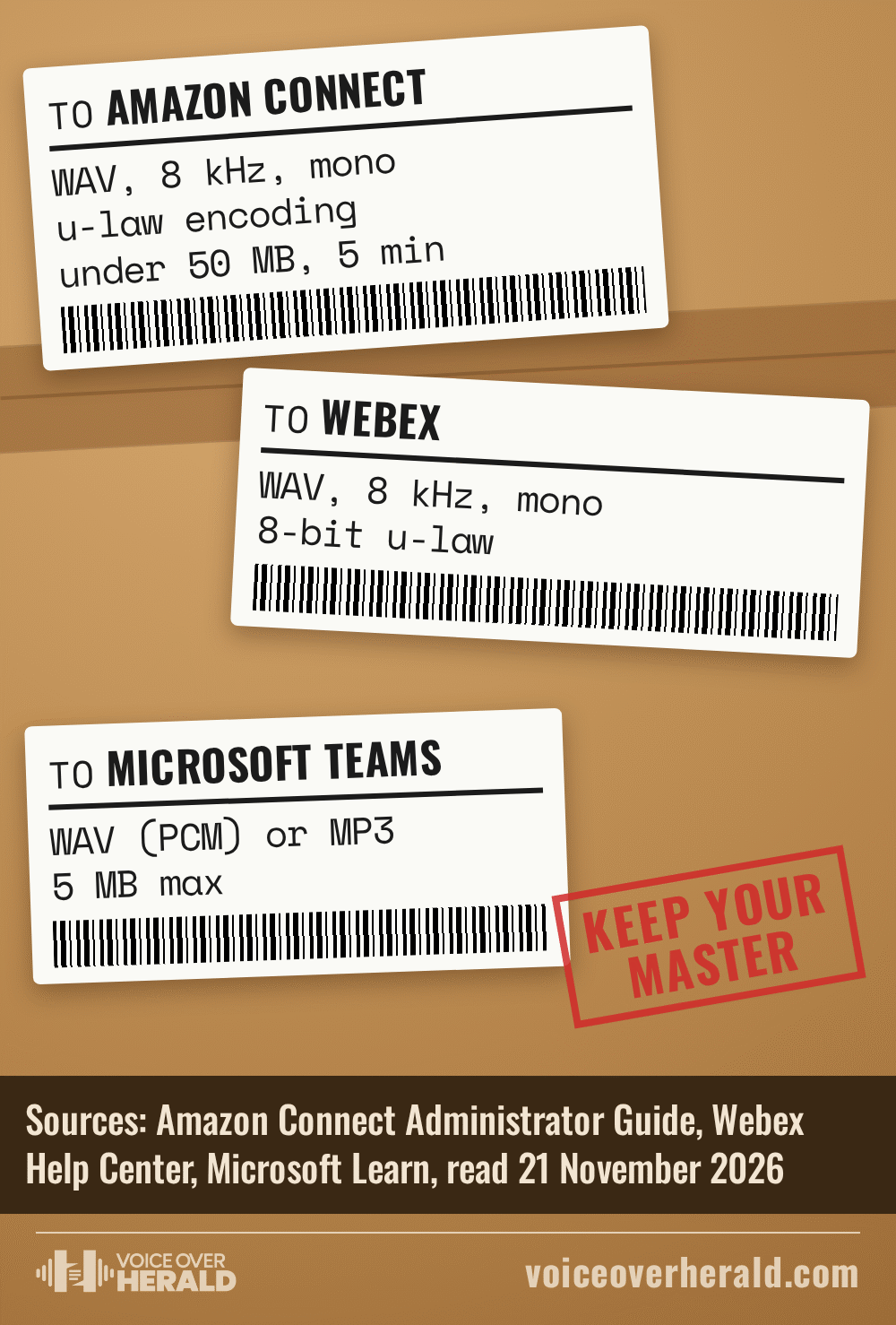
Microsoft’s postproduction guide explains what the squeeze does to a voice: “High frequency speech sounds like the “s” and “sh” sounds are particularly vulnerable during the down-sampling process.” So keep your master at your normal studio quality, make the phone version from it, and listen to that phone version before you send it. A crisp “s” in your booth can turn soft or lispy at 8 kHz, and it’s far better that you hear it than the client’s callers.
How phone work is priced
Voice actors who publish their rates often price phone work apart from advertising. British voice actor Marcus Hutton lists IVR, the industry’s name for phone menu systems, among the work where “Usage will not be applied,” and among the sectors where “I don’t charge a BSF generally,” meaning his basic studio fee. For the prompts themselves his rates page simply says: “Please ask for rates.“
Leonie Schliesing’s rates page shows the gap in plain numbers. Her commercials start “from £300 BSF + Usage,” while phone work reads “IVR from £50.” Those are one actor’s published starting points in pounds, not an industry standard, but they show how phone jobs are usually sized: by the script, not by the airtime.
Whatever you charge, agree how pickups are priced before the first session, because there will be pickups. Clients who come back every few months for new lines are the point of this work.
- Names. Every file named exactly as the script lists it.
- Platform. You know which phone system it’s for and what format it wants.
- Master. A flat, untouched copy is saved separately from the phone version.
- Listen. You’ve played the converted file, not just your studio take.
- Notes. Mic, distance, gain and a reference file are saved for the next pickup.
Phone work rarely makes anyone famous, though Susan Bennett thought she was recording phone menu lines and later heard herself as Siri. For specs in other genres, see our guide to delivery specs for audiobook, dubbing and radio clients.
Sources: Amazon Connect Administrator Guide, “Create prompts” and “Set up prompts to play from an S3 bucket,” docs.aws.amazon.com; Microsoft Learn, “Auto attendant and call queue supported configurations”; Webex Help Center, “Manage audio files”; Twilio, “TwiML Voice: <Play>”; Microsoft speech technologies guide (archived, 2006), “Recording Audio,” “Audio Production,” “Editing Audio” and “Postproduction Techniques”; Leonard Klie, “Not Everyone Has a Phone Voice,” Speech Technology magazine, 1 April 2007; rates pages of Marcus Hutton (voice-overs.cc) and Leonie Schliesing (leoniedoesvoices.com). All read 21 November 2026. Screenshots: docs.aws.amazon.com and learn.microsoft.com, 21 November 2026.
Lee este artículo en español: Gracias por esperar: cómo se encargan, se graban y se entregan los trabajos de voz para menús telefónicos
Know something about this story, or spotted an error? Tell the newsroom.