

Your Director Is in Another Country: The Remote Session Tools That Replaced ISDN, and the One You Might Pay For
A client books you for a directed session and says they’ll send a link. Not long ago that meant an ISDN line, a codec box and a phone bill. Now it means a browser tab or one piece of software, and in the UK the old copper network has a closing date. Here’s what the main remote session tools do, which side of the call pays, and how to be ready before anyone says “rolling”.
This is a reference piece, not an advert. Every price and spec below is quoted from the maker’s own page, read on November 4, 2026. Prices change, and some are shown before tax, so check the page on the day you buy.
The phone line that ran voice over is nearly gone
For a generation of voice actors, being directed live from home meant ISDN: a digital phone line, a codec in the rack and a monthly bill. In the UK that era now has an end date. Openreach, which runs most of the country’s phone lines, plans to retire its copper PSTN and ISDN networks on January 31, 2027, a date pushed back from the end of 2025, DatacenterDynamics reported on October 30. Openreach raised rental prices for legacy ISDN services in October, with more rises due from February 2027.
 VoiceEditSuiteAuto Clean Up now learns you.Your breath, your pace and every fix you make, so each file comes back sounding like you edited it yourself.See how it worksLearns from numbers, never your audio. Never used to train AI.
“The straightforward migrations have largely been completed. What’s left are the complex connections that underpin critical operations,” said James Lilley, director of All-IP at Openreach, in the same report.
Studios mostly moved years ago. ipDTL, one of the tools many of them use, puts it plainly on its home page: “SIP is the protocol for connecting between studios, which has replaced ISDN.” SIP is simply a standard way for two pieces of audio gear or software to call each other over the internet. For a voice actor the bigger change is at your end of the line. You don’t need special hardware any more. In most sessions you need a browser, or one app.

Most of the time, you’re the guest
Here’s the part that saves you money. In a directed session the studio, producer or client usually hosts, and you join. Most browser tools are built around that: the host pays, and the person they invite clicks a link.
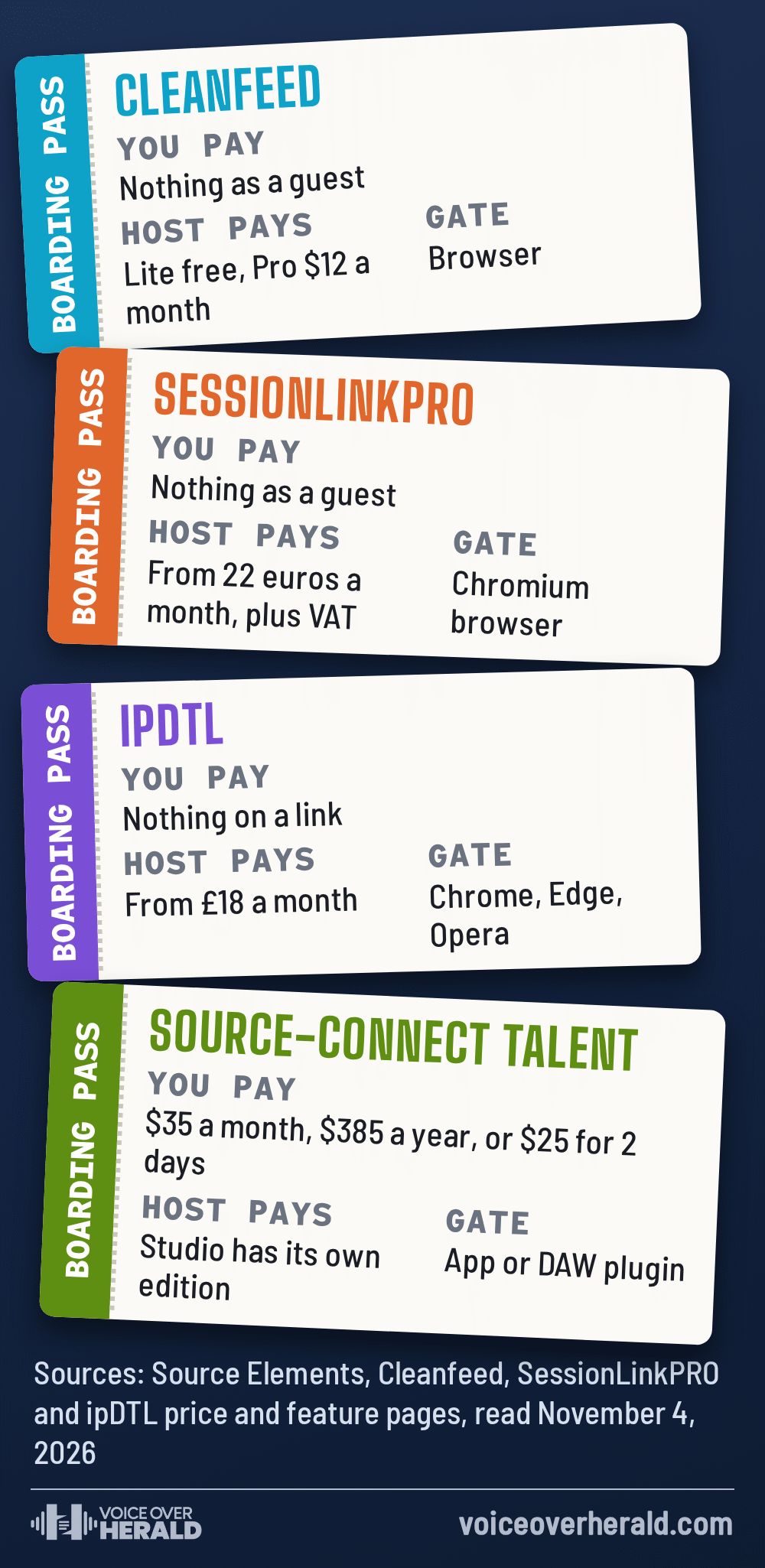
Cleanfeed is the clearest example. Its pricing page says “Cleanfeed Lite is free to get started, and that includes commercial use.” Lite takes two guests with mono remote audio, and Cleanfeed Pro is listed at “$12 monthly”, with “an additional 20% discount” for yearly renewal. Its FAQ says it uses the Opus codec and that you’ll “be set up in mono for voice by default”. The recording happens live at the host’s end, so there’s no file for you to upload afterwards. Guests can join on an up to date Firefox or Safari, though Cleanfeed doesn’t officially support those browsers for the host’s studio.
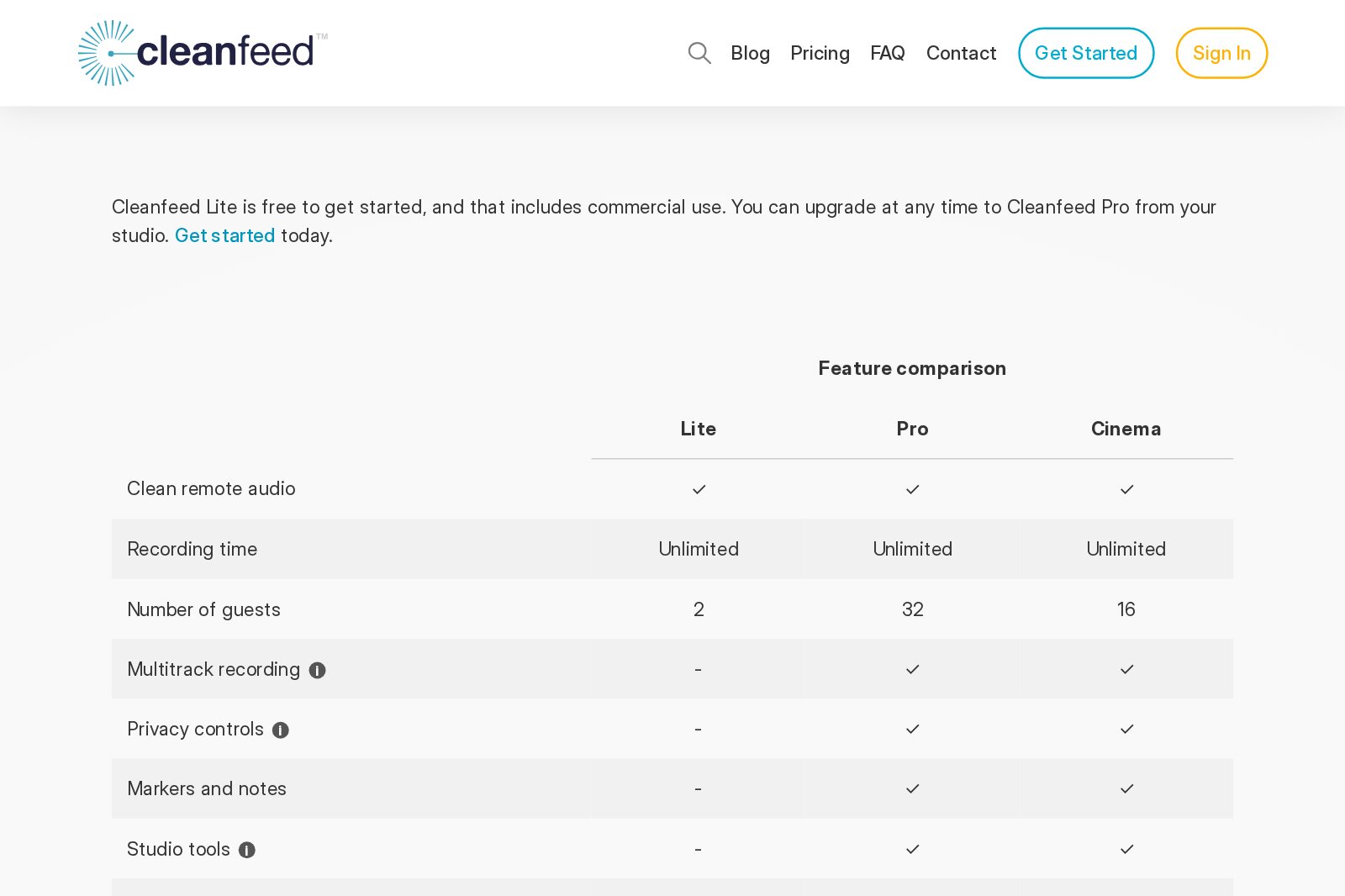
Cleanfeed's pricing page, as shown on November 4, 2026. Screenshot: Voice Over Herald
SessionLinkPRO, from a company in Düsseldorf, works the same way. Its product comparison lists free guest links on every product and Chromium based browsers, such as Chrome and Edge, on the host side. Its Recording product carries up to 256 kbit/s mono or 510 kbit/s stereo in Opus, or uncompressed L16 PCM, and costs 22, 121 or 220 euros for one, six or twelve months, before VAT. Its Dubbing product, built for three guests, is 40, 220 or 400 euros.
ipDTL, from the UK, starts “From £18 per month” with a three day trial for £1, and runs in Chrome, Edge or Opera. Inviting someone with a browser link is an add-on on its Bronze, Silver and Gold plans and included in its Day Pass, according to its feature comparison. Each username also gets its own SIP address, which is how it talks to studio codecs.
When the studio asks for Source-Connect
Some clients, especially post houses, dubbing studios and anyone recording you straight into Pro Tools against picture, will ask you to connect on Source-Connect. It’s software you install, made by Source Elements, and the maker’s own summary calls it “The industry standard in remote voice, music and sound capture.” It’s the one tool on this list a voice actor commonly pays for.
The edition for performers is called Talent. Source Elements lists it at $35 a month or $385 billed yearly, or as a $650 buy-in that includes six months of network access, after which access “renews at $145 a year”. For a single job there’s a short-term Talent licence at $25 for two days, and the page notes that short-term licences don’t include support. There’s also a 15-day free trial with no credit card. Talent carries stereo at up to 48 kHz and “Up to 160kbps per channel”, and runs on its own or as a plugin in DAWs including Pro Tools, Reaper, Audition and Logic Pro.
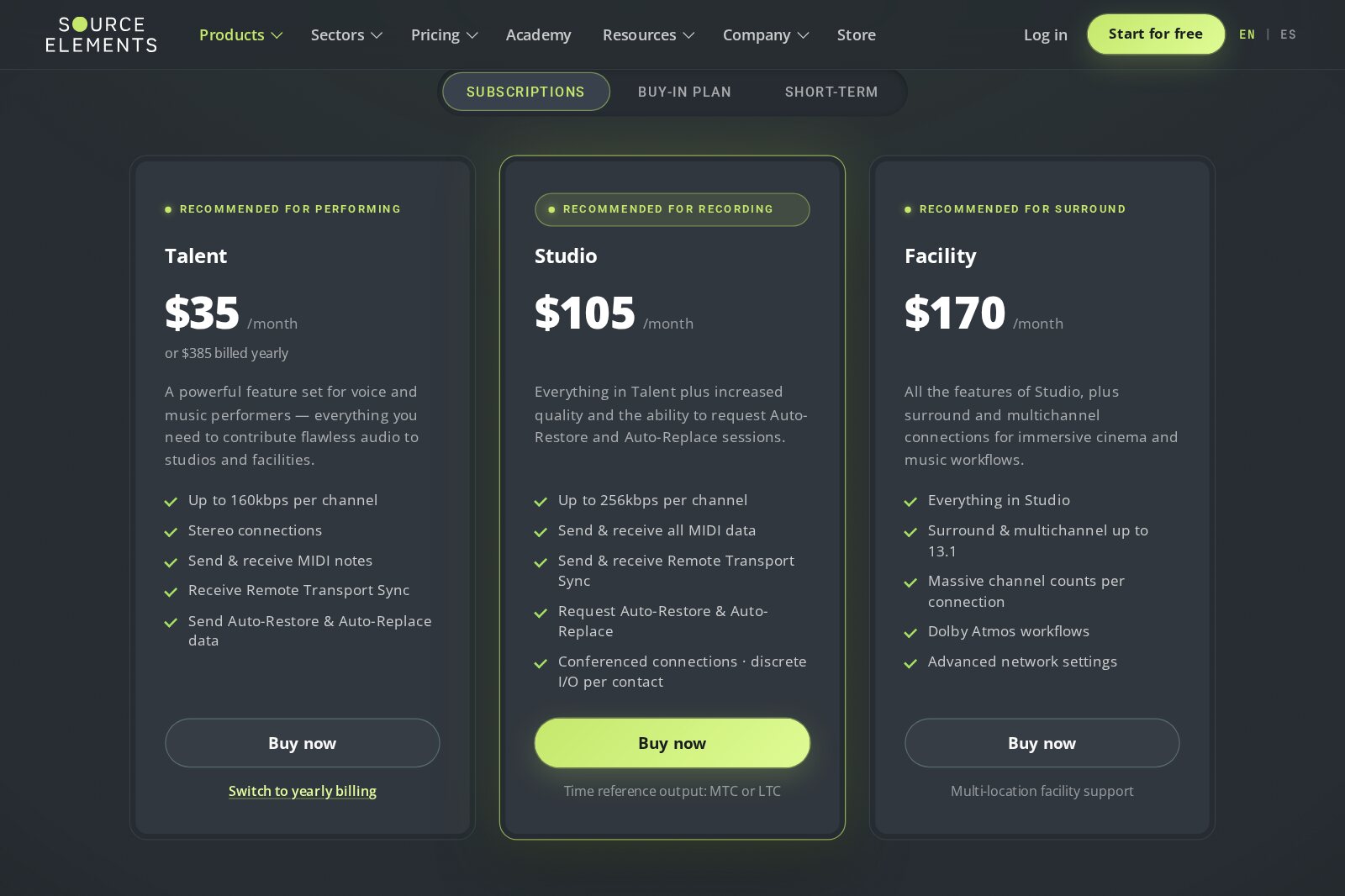
Source-Connect's subscription tiers on source-elements.com, as shown on November 4, 2026. Screenshot: Voice Over Herald
The feature studios care about most is what happens when the internet hiccups. Source Elements says “Auto-Restore fills any audio lost to the network, and Auto-Replace swaps back up files with full-quality source files that conform to your timeline.” In plain terms, your computer keeps a clean copy of each take and the software patches the engineer’s recording with it. On Talent you send that data. Requesting it is a Studio feature, so the engineer’s end decides whether it’s used.
Memo Sauceda, an Emmy winning voice actor, described a session on the new version on the maker’s site: “Carlos Rondon and I recorded a voiceover between his home studio in Weston, Florida and my studio in Monterrey, Mexico.” He wrote that version 4 “is more stable, has less latency (Carlos couldn’t feel any latency at all!), and we found it sounded even better.”
Browser link or installed software?
The makers disagree, politely, and both have a point. Source Elements argues for software on your own machine. The browser tools say having nothing to install is the whole appeal.
Source-Connect
Source Elements says browser tools “are constrained by internet browser limitations, variable sample rate conversion, and aggressive browser audio processing.” Its case is higher sample rates, sync with the studio’s DAW timeline, and dropout repair from your local takes.
Cleanfeed, SessionLinkPRO, ipDTL
Click a link and you’re in. On a locked down office network, Cleanfeed’s FAQ says, “The latency may be compromised in such a restrictive network, but audio quality will never be.”
For a voice actor, the choice is usually made for you, because the studio picks the tool. What you control is whether you can say yes on the day. A Cleanfeed guest link costs you nothing. Source-Connect costs money every month whether anyone books you on it or not, which is why the two-day licence exists for the odd job.
And when it’s just Zoom
Plenty of corporate and e-learning clients simply send a Zoom invite so they can listen while you record at your end. Zoom’s standard settings are tuned for meetings, and they clean up your sound in ways a director doesn’t want to hear. The University of Michigan’s Zoom guide explains the fix: “Original sound allows you to preserve the sound from your microphone without using Zoom’s echo cancellation and audio-enhancing features.” In the desktop app it’s under Settings, then Audio, where you tick “Original sound for musicians” under Microphone modes. In a meeting you switch it on from the arrow next to the microphone icon. In these sessions the files you record yourself are usually what gets delivered, so the call is there for direction, not for the final audio.
Whatever the tool, the goal is the one every engineer describes. Emma Butt, an ADR recordist and re-recording mixer, wrote on Source Elements’ site that Source-Connect is “straight forward, easy to use and reliable,” and that remote sessions “enable us to still capture much needed dialogue if an actor is no longer in the same country.”
Before the director says go
The first five minutes of a remote session, while everyone is still finding each other, are the ones you can prepare for. A short routine helps:
- Ask which tool, and who hosts. If it’s a browser link, check which browsers it supports. If it’s Source-Connect, ask whether they want you on Talent, and when, so a two-day licence covers the right days.
- Rehearse the day before. Source-Connect has a 15-day trial and Cleanfeed Lite is free, so you can test a connection with a friend before a client ever hears you.
- Wear closed headphones. The director’s voice comes back to you; on speakers it goes straight into your mic.
- Record at your end as well. Even when the studio records the stream, a clean take on your own drive is the backup everyone thanks you for.
- Clear the line. Pause cloud backups, big downloads and the video call on the other laptop while you’re live.
ISDN made a remote session an investment in hardware and line rental. Today the main investment is a quiet room, a steady connection and ten minutes of setup, and more often than not the studio pays for the link. Keep a note of which client uses which tool, and the next “can you do a live session tomorrow?” becomes an easy yes.
Sources: Source Elements, Source-Connect product and pricing page, including statements by Memo Sauceda and Emma Butt; Cleanfeed, pricing page and FAQ; SessionLinkPRO, product comparison; ipDTL, home page and feature comparison; DatacenterDynamics, “Openreach issues warning over January’s PSTN switch-off” (October 30, 2026); University of Michigan ITS, “Zoom: Enabling Original Sound / Music and Professional Audio Settings”. All read November 4, 2026. Screenshots: Voice Over Herald. Main image: © Voice Over Herald.
Lee este artículo en español: Tu director está en otro país: las herramientas de sesión remota que reemplazaron a ISDN, y la que quizás pagues tú
Know something about this story, or spotted an error? Tell the newsroom.